Welcome to the website for landscape facilities products and knowledge.

How does the table’s design support or inhibit the use of technology, such as laptops or tablets?
The integration of technology into daily work has made table design a critical factor in productivity and comfort. A well-considered table directly supports tech use through specific features. Ergonomic height, for instance, is paramount; a surface too high or low strains the neck and wrists during prolonged laptop use. The ideal design offers adjustability or a dedicated lower keyboard tray to align screens at eye level. Surface space and layout also play crucial roles. A deep table provides ample room for a laptop, external monitor, and tablet simultaneously, while strategic cut-outs or grommets facilitate organized cable management, preventing clutter and tangling of charging cords.
Conversely, poor design actively inhibits functionality. Tables with insufficient depth force devices too close to the user, causing poor posture. A lack of built-in power outlets or USB ports necessitates awkward extension cords, creating hazards. Non-reflective, matte surfaces are essential, as glossy finishes create screen glare, increasing eye strain. Materials matter too; hard surfaces should be paired with wrist rests, while soft materials might not provide stable support for devices. Modern designs increasingly incorporate dedicated solutions like tablet docking grooves, wireless charging pads, and monitor arms, seamlessly blending furniture with technology. Ultimately, a table is no longer just a static platform but an interactive component of the tech ecosystem. Its design either fosters a fluid, efficient workflow by accommodating devices and their peripherals or becomes a physical barrier to effective technology utilization.
Related search:
Recommendation
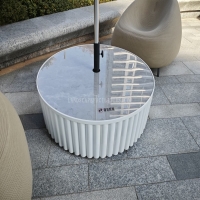
Round metal tube border design table with tempered glass or granite countertop on the top.